Quo Vadis III

We here at Mandated Memoranda Publishing have just released book four to our advanced copy readers. Yes, this is actually book three, but we missed our Christmas deadline, ergo, book four. The title is A Digital Carol. From the protean blurb with which we’ve been toying:

This is a tale from our childhoods retold in modern language and forms. The story’s goal is not to inspire a more joyous holiday or a more generous giving spirit, but to question the very premise of our existence. We are too late into the dark night of the soul for anything but drastic measures.

We purchased the imagery for the cover and hope to post the blurb and quarter scale cover image on the MM books tab soon. We plan to use the same editing service that we used for Tragic Wonders to better effect this time. If we get a good review (who knows), then we’ll splurge on professional promotion.

Apropos of nothing more than sympathy for the Ukrainian people, here’s Wikimedia Commons Picture of the Year 2013 – Second place finisher:

National park Holy Mountains, Donetsk Oblast, Ukraine

National park “Sviati Hory” (Holy Mountains), Donetsk Oblast, Ukraine – Attribution: Balkhovitin (License: CC BY-SA 3.0)

Meanwhile, as folks eagerly purchase in app gaming benefits, we scour the interwebs everyday researching for our next two books. Book three is titled Who Shall Be God and book five is China Dream.

Some of the books we plan to read for WSBG are:

The Righteous Mind: Why Good People Are Divided by Politics and Religion—Jonathan Haidt

The Servile Mind: How Democracy Erodes the Moral Life—Kenneth Minogue

The Revolt Against the Masses: How Liberalism Has Undermined the Middle Class—Fred Siegel

Liberty: Rethinking an Imperiled Ideal—Glenn Tinder

The Three Languages of Politics—Arnold Kling

Some articles that have impressed us are:

Progressives Against Progress—Fred Siegel (City Journal, 2010)

Can We Be Good Without God—Glenn Tinder (Atlantic, 1989)

The False Equation of Atheism and Intellectual Sophistication—Emma Green (Atlantic, 2014)

Bigger Than Phil—Adam Gopnik (The New Yorker, 2014)

Keeping the Faith in My Doubt—John Horgan (NY Times, 2004)

I don’t think I’m giving too much away when I quote Tinder from his Atlantic article:

Tocqueville suggested approvingly that Christianity tends to make a people “circumspect and undecided.” with “its impulses…checked and its works unfinished.” This expresses well the spirit of reform inherent in Christian faith. Christianity is radical, but it is also hesitant. This is partly, of course, because Christianity restrains our self-assurance. Efforts at social transformation must always encounter unforeseen complexities, difficulties, limits, and tragedies. Caution is in order. But Christian hesitancy has deeper grounds than prudence and more compelling motives than wariness of practical blunders. Hesitation expresses a consciousness of the mystery of being and the dignity of every person. It provides a moment for consulting destiny. Recent decades have seen heroic political commitments in behalf of social reform, but hesitation has been evident mainly in the service of self-interest. Christian faith, however, suggests that hesitation should have a part in our most conscientious deeds. It is a formality that is fitting when we cross the frontier between meditation and action. And like all significant formalities, it is a mark of respect—for God and for the creatures with whom we share the earth.

Is our program this year a tad ambitious? You betcha. Worse still, we hope to write about these and other sources in the coming weeks and months.

Self–Publishing – Love It or Leave It (Part 2)

A few days ago, I hit the ‘save and publish’ button on the Kindle Direct Publishing (KDP) website to launch Mandated Memoranda Publishing’s second book: Tragic Wonders – Stories, Poems, and Essays to Ponder. I found one glaring (to me) error in a chapter title very late in the quality control process. I left it.

This post is an update to a previous article on self–publishing. Several things are new with Kindle Previewer software and my process.

The Kindle Previewer (KP) version I used is 2.92. KDP no longer provides an emulated means to check your Kindle files targeted to iPhone/iPad. It generates a file with extension .azk. You’re supposed to sideload it to your Apple device to test it. I have no Apple device.

Additionally, KP 2.92 generates a fault when it produces the .azk file. Windows captures the fault this way:

Description  
Faulting Application Path: C:\..\Amazon\Kindle Previewer\lib\phantomjs_mobi82html.exe
Problem signature  
Problem Event Name: BEX
Application Name: phantomjs_mobi82html.exe
Application Version: 0.0.0.0
Application Timestamp: 4f7753dc
Fault Module Name: nvinit.dll_unloaded
Fault Module Version: 0.0.0.0
Fault Module Timestamp: 50ef1ca7
Exception Offset: 7520ce59
Exception Code: c0000005
Exception Data: 00000008
OS Version: 6.1.7601.2.1.0.256.48
Locale ID: 1033
Additional Information 1: 0a9e
Additional Information 2: 0a9e372d3b4ad19135b953a78882e789
Additional Information 3: 0a9e
Additional Information 4: 0a9e372d3b4ad19135b953a78882e789
Extra information about the problem  
Bucket ID: 4075841998

I sent a query to KDP about the fault and didn’t receive a reply once they figured I wasn’t asking for advice on my .azk file. This was a tad disturbing, to say the least. Then I went ahead and published Tragic Wonders. A friend with an iPhone purchased the book and said it worked fine. However, on 10 January 2014, I received a query from KDP about this issue. We’ll see if anything good results from the continued discussion.

Enough talk of Amazon’s problems. On to the new features of our process, some of which may be technical. We discovered and corrected some upsetting features imposed by Microsoft’s Notepad application. We used the text–align style attribute for chapter titles and table of contents (TOC) entries. We figured out some intricacies of nested .ncx file logical TOCs. We tried a different approach for page-breaks. Finally, we used Kindle Previewer to generate our last few .mobi files that we submitted to Amazon KDP.

We discovered through some disturbing errors in our .mobi files that Notepad was inserting non–printing characters. How could we tell if they were non–printing? It showed up in truncated logical TOC entries (generated by Kindlegen from .ncx entries) during the QA review. It also showed up in HTML TOC errors in the .mobi file text. Both errors occurred at the point where the lines in the files (.ncx and .htm) word wrapped.

It turns out this is well documented and has been an issue since Notepad first appeared. A workaround is: don’t narrow the Notepad application window so any TOC or logical TOC text word wraps. If you’ve done so and you have funny truncation error then you can retype those entries like I did (very tedious). A solution may be to use Notepad++ (but I haven’t, yet).

We used the text–align attribute to left justify chapter titles and TOC style entries. Amazon’s Kindle Publishing Guidelines only discourage specifying alignment for body text so it reflows freely.

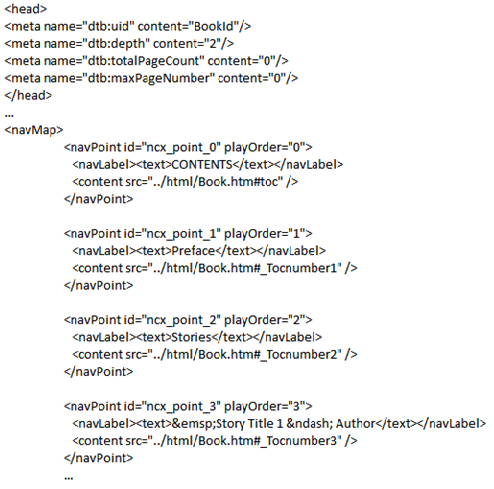
We figured out some intricacies of nested .ncx file logical TOCs (and didn’t figure out other things). This is  genericized excerpt from our .ncx file:

ncx

I call your attention to the em space setting off Story Title 1 as an indent. This conveniently differentiated story titles from section titles. Turns out there is another way, but not all eBook distributors use that method.

Having had difficulty with page breaks in our first book Tiānmìng – Mandate of Heaven, we tried a different approach to page-breaks this time. Using <br> without <p> or other formatting to end chapters seems to work. This is an example of what we did:

htm

We discovered that KDP was using a file structure to read and assemble their .mobi file (the one you can download from them) after you submit your files to KDP. I remember reading about that somewhere in the literature but now I had a concrete example in the zipped HTML files KDP produced for download. I recommend you use those HTML files for further development once most of your bugs are shaken out (i.e., after final edits are long done and most formatting issues have been retired).

You’ll need to package your files into separate folders labeled: image, xml, and html. The image folder contains your image files. The html folder contains your .htm file (if you use one .htm file like I have, up to now). And the xml folder contains your .ncx file. The .opf file should reside with these folders either on the desktop or in your working folder. The files that come from KDP expect this structure (you can see the changes from your original files in the downloaded ones when you compare them).

We used the HTML files KDP generated to finish our development after we went a few rounds with Amazon KDP’s Kindlegen to shake out bugs. This led us to use Kindle Previewer on our .opf file to produce a .mobi file. Kindle Previewer invokes Kindlegen and even produces the verbose error report we use to validate our .mobi files. We submitted the resulting .mobi file to KDP and did final quality assurance (QA) testing with the .mobi KDP produced from our submittal. I plan on structuring my files using this new approach in future books.

After I completed my book, I happened on these two eBooks on Kindle formatting and process. The first, The eBook Design and Development Guide [Kindle Edition], by Paul Salvette (Author), emphasizes formatting using cascading style sheets (CSS). It does a masterful job of explaining in simple terms how to use them. The process that is described bypasses the MS Word to filtered webpage step by copying and pasting the original manuscript into a text file and proceeding from there. I think this approach avoids some errors while enabling others.

The second book, EBook Formatting: KF8, Mobi & EPUB [Kindle Edition] by Matt Harrison (Author, Illustrator), says it is purely concerned with formatting. Heavily programming oriented, I expect it will provide clues for me to format my next book more professionally.

I’m not sure why Amazon’s KDP Systems Architect or chief designers can’t put out a series of books on Kindle book development akin to Microsoft’s series. I’d be first in line to buy the reference (if it’s $9.99 or less, of course).

Tragic Wonders in Times Square

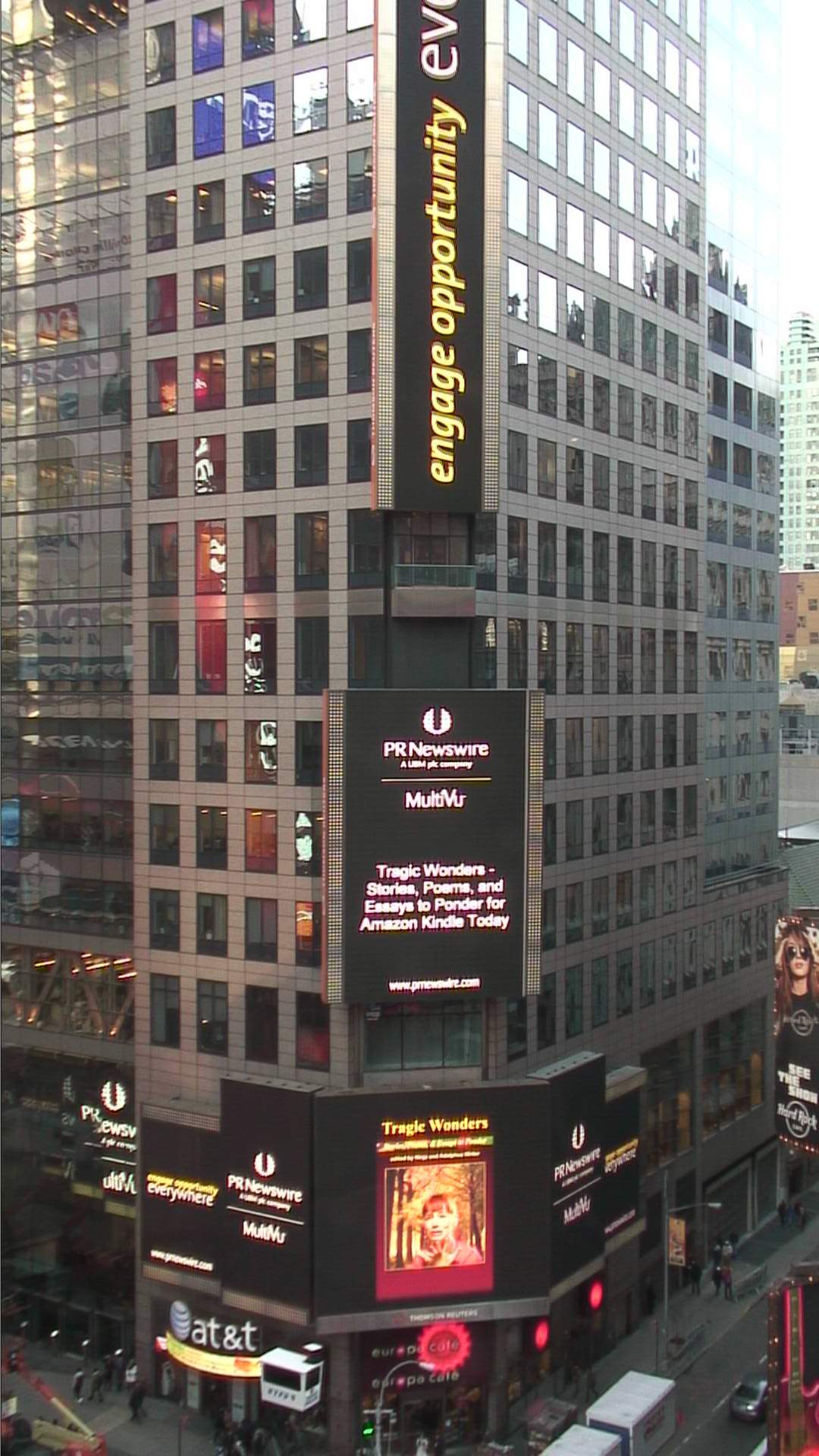
Mandated Memoranda Publishing, LLC received, as part of our press release package, 105 seconds of exposure for this ad on the Thomson Reuters Sign at 43rd Street and 7th Avenue in Times Square.

Tragic Wonders - Stories, Poems, and Essays to Ponder for Amazon Kindle on the Thompson Reuters building in Times Square

Tragic Wonders – Stories, Poems, and Essays to Ponder for Amazon Kindle on the Thompson Reuters building in Times Square. (PRNewsFoto / Mandated Memoranda Publishing, LLC)

The ad was shown seven times at 15 seconds each. This one appeared at: 2013 12 31  – 09:18:38 [9:18 am on New Year’s Eve]. All the shots were either 9 am or 4 pm. One was 9 am on New Year’s Day. According to Google Streetview, the Thomson Reuters Sign is here:


We will do this for our next release; but we’ll add PR Newswire’s Twitter feed service.

Tragic Wonders – Stories, Poems, and Essays to Ponder Press Release

Mandated Memoranda Publishing Announces Second Book

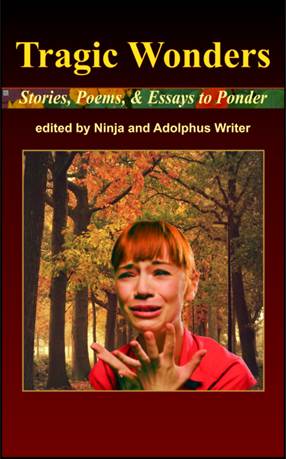
Tragic Wonders – Stories, Poems, and Essays to Ponder, Edited by Ninja and Adolphus Writer, Exclusively on Amazon as a Kindle Edition, a Mandated Memoranda Publishing, LLC release.

Tragic Wonders - Stories, Poems, and Essays to Ponder cover image

Tragic Wonders – Stories, Poems, and Essays to Ponder, Edited by Ninja and Adolphus Writer, Exclusively on Amazon as a Kindle Edition, a Mandated Memoranda Publishing, LLC release. (PRNewsFoto / Mandated Memoranda Publishing, LLC)

SYRACUSE, N.Y., Dec. 30, 2013 /PRNewswire-iReach/ — We all love to be entertained. But, what if that entertainment has other ideas? We asked our pseudonymous authors to write stories, poems, and essays of tragedy and wonder that delve into our souls’ deepest fears and needs.

(Photo: http://photos.prnewswire.com/prnh/20131230/MN38815)

In the short stories, you’ll meet a serial killer, alien snails, a petulant eleven–year–old, a beloved astronaut, a laid–off worker, and many others. Two poems provide a transition from fiction to opinion. The essays castigate, decry, praise, and skewer our personal, local, national, world, and cosmic conditions.

These writings are meant to engage readers in a reality that we all deny daily, whether we profess faith in Christ, are ambivalent, or are hostilely opposed to religion.

What if this world we live in is set up as a diabolical trap meant to prevent us from seeing that which is truly necessary? The anthology focuses on themes, situations, and emotions that are tragic, full of wonder, or, combined in some way, both.

We hope you’ll suspend your disbelief and consider the possibility that there is a way out of the trap in which we find ourselves. And that way doesn’t involve choosing between two different color pills.

Quote

“Maybe there’s a message in what great scholars once called futility or vanity? Perhaps there’s only one thing truly necessary.”—Karen Monteverde

Review

This isn’t an easy read, but it is a rewarding one, as the stories are crafted with great care. All in all, if you are the kind of reader who likes to have their own assumptions on how reality truly exists questioned by the written word, then this is sure to be an enjoyable book for you. –Red City Review, November 23, 2013

About the editors

Ninja (NEEN–yuh) S. Writer was born in Wolfsburg, West Germany. She majored in political science with a minor in mechanical engineering and volunteered for the Bundeswehr in 1994 when she learned a woman had attained the rank of general. She and Adolphus met while he was traveling in Germany. They married when she moved to the United States after completing her military service.

Adolphus Writer holds a doctorate in theoretical physics. After he graduated, he travelled to Europe, the Middle East, and Far East. Upon his return, he took a job at a large US defense firm applying his creative and analytical skills to pressing problems. He and Ninja corresponded extensively prior to their engagement.

In early 2012, Adolphus established Mandated Memoranda Publishing, LLC as a way to support the lifestyle to which he and his family had become accustomed. He says they like to eat on a daily basis and stay debt–free.

About the publisher

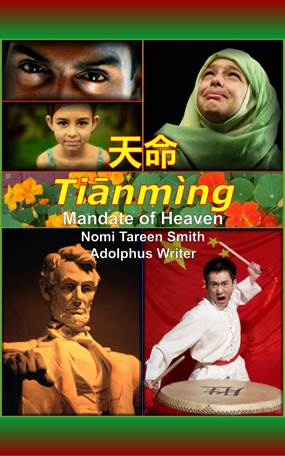
Mandated Memoranda Publishing, LLC published Tiānmìng – Mandate of Heaven as a Kindle edition in June 2013. It is an everyman’s spy adventure – a reluctant journalist’s tale of economic calamity, geologic catastrophe, geopolitical power shifts, and the beginnings of a hands–on surveillance state.

We plan to release a third Kindle edition, Who Shall Be God, a fictional account of the struggles between two families, the Stadists and the Libertas, who live in an east coast US city, north and south of the 38th parallel, respectively. Expect it on Amazon’s shelves in 2014 by the fall.

Book four, A Digital Carol, is a reimagining of the old Dickens’ favorite for a future generation. We are targeting it for Christmas, 2014. The working title for book five is China Dream. It’s still in process, as is the dream itself.

Book Details

Tragic Wonders – Stories, Poems, and Essays to Ponder

Edited by Ninja and Adolphus Writer

http://www.amazon.com/dp/B00HI79VE4

Anthology: realism, thriller, science fiction

1st edition, released December 15, 2013

By Mandated Memoranda Publishing, LLC

Exclusively as an Amazon Kindle Edition

ASIN: B00HI79VE4

ISBN: 978-0-9855327-1-0

Simultaneous Device Usage: Unlimited

150 pages (estimated)

More Details Online

On Goodreads

On Shelfari

Adolphus Writer (@AdolphusWriter)

Ninja S. Writer (@NinjaSWriter)

Mandated Memoranda Publishing, LLC

mandatedmemorandainquiry at outlook.com

News distributed by PR Newswire iReach: https://ireach.prnewswire.com

SOURCE Mandated Memoranda Publishing, LLC

RELATED LINKS
https://mandatedmemoranda.com/

Find this article at:
http://www.prnewswire.com/news-releases/mandated-memoranda-publishing-announces-second-book-237970761.html

Quo Vadis II

Tragic Wonders 1 by 1_6 quarter scaleWe’re almost finished with a round of editing for Tragic Wonders. In prior posts, you’ve seen some of the stories and essays that we dropped from TW because of thematic duplication. We’ve also separated out two poems that now provide a transition from the stories to the essays. The next step is copy editing. Seems the company is geared towards Microsoft Office production but, for the money, they’ll accommodate Amazon Kindle requirements. Whew! Actually, they’ve been encouraging, cooperative, and fast. We’ll see how much we can say about them at a later date.

At this point, we plan to get TW out before Christmas (Thanksgiving is the real goal, but…). To do that, I want to have at least two professional reviews in place before issuing the press release and posting the Kindle book to Amazon and registering with the LOC and Red City Reviews usually posts to Goodreads but Goodreads requires an ASIN, Amazon’s ISBN equivalent… You get the idea, the timing will be tricky. Also, we were planning on switching from PRWeb to PR Newswire. You know, the PR firm recently hacked for customer data.

We’ve had several favorable reviews on TW’s all important cover. Yes, it turns out we do judge a book by its cover (among other things, like favorable excerpts from perhaps unfavorable professional reviews).

Right now, we have Tiānmìng – Mandate of Heaven priced at 99 cents. We’re going to raise the price back to $2.99 when TW comes out at 99 cents. In other news, we’ve decided to postpone publication of A Digital Carol until next Christmas. Actually, we’ll get it out before Thanksgiving 2014 to pick up on the buying season. We’ve already got the cover concept roughed in.

Yup, we’ll get this marketing thing down, yet. Hopefully, before we’re out of funds.

We plan to start Who Shall be God early in 2014 while ADC is in editing (yes, book three, that became book four, is book three again). The WSBG themes are coming together. It turns out that the 38th parallel not only runs through the Korean DMZ but through Virginia and Maryland. Hmm, I wonder if that’s significant given what DC has been doing lately?

Book five is about China. We’re still waiting for Xi and company to declare their intent after the Third Plenum meeting of the Communist Party’s Central Committee. Other news of interest is that China has twice the shale gas reserves as the US does. That should swing the balance all other things being equal. We’ll see.

And finally, we’ve updated our links page.

Research

The Last of the Spirits, from Charles Dickens:...

The Last of the Spirits, from Charles Dickens: A Christmas Carol. In Prose. Being a Ghost Story of Christmas. With Illustrations by John Leech. London: Chapman & Hall, 1843. First edition. (Photo credit: Wikipedia)

If you’ve read our first book: Tiānmìng – Mandate of Heaven, and who hasn’t ;-), you’ll know we at Mandated Memoranda Publishing do research and lots of it. Currently, we’re working on what we affectionately call Book Three. Its working title is: A Digital Carol.

We are reimagining the old Dickens’ favorite for a future generation. The gist of the old story revolves around the Victorian era’s fascination with ghosts and spirits. The new one, obviously, has to feature AI. But not just any AI, we feature Artificial General Intelligence, or AGI.

We’re all familiar with Big Dog, Cheetah, and Atlas. If not, we should be. These are specialized robotic machines that adapt to their environments in order to accomplish limited scope missions. However, these do not possess the ability to generalize their missions to encompass any goal, even self set goals. Others would like to make what may turn out to be a limited aspect of AGI available widely. We are nowhere near true AGI. Some think this is a very good thing.

There is a philosophic difference between what AI we currently have available and what may come about in the future. We deal with this theme in A Digital Carol. We also deal with the temptation to “kick away the ladder” when opportunity for our aggrandizement presents itself. Of course, we needn’t repeat the admonition that many attribute to mere superstition, do we?

Is 99 Cents the New Free?

Tianming CoverI can definitely assert that using ‘free days’ in the KDP Select program to boost book sales or visibility doesn’t work after the debut offering. I’ve tried using free days prior to the July 4th and Labor Day holidays only to realize a decrease in sales rank when the sale days were over.

I have 150 free copies out there all over the world and I know three of my four book reviewers (I have a good guess on the fourth). Each of them, likely, paid full freight.

I’ve tried other things to boost sales, too. I’ve put out a press release. Don’t be fooled by so-called ‘impressions’; only sales count. I did an author interview. It was very nicely presented but the site draws a limited audience. I have a Goodreads page. This site rejected me as an author for some reason.

I contacted Amazon Vine and Top reviewers in my book’s genre (spying & intrigue). Of the eight I contacted, one put me on his to read pile. He has a policy of not slamming books he doesn’t like; I greatly appreciate that attitude.

However, whining gets you nowhere.

I’ve got a second book in the works and I’m trying even harder than at first. Better writing. Better editing. Better marketing. Pricing based on page count. I’m sticking with KDP Select when it makes sense (70% royalty and the Lending Library program). And I’ll try to release a third book this year.

I’m going to have Red City review the first book, Tiānmìng – Mandate of Heaven, to find out what they think about it. We’ll have to see. There’ll be no welfare payments for this author.

Have You Seen our Links Page?

No, we haven’t misplaced it; it’s right here. I’m afraid it fell into disuse while we were developing our first novel. We’re now trying to increase sales without making ourselves a nuisance to our friends. We haven’t succeeded at that yet, I’m afraid. But, we’ll keep on trying.

This web log is Mandated Memoranda Publishing’s primary vehicle to communicate with friends. You can also find Adolphus Writer on Twitter and, to a lesser extent, on Google+ and Facebook. You can contact us at:

MM @ Outlook

We’ll try to remember to update our links page more often as we prepare book two, Tragic Wonders. And, no, we haven’t forgotten the promised cover page thumbnail.

If you know of up-coming book contests and awards competitions that recognize author achievement, please drop a line.

Self–Publishing — Love It or Leave It

What a long, strange trip… Sing it with me. We here at Mandated Memoranda Publishing LLC have just given birth to: Tiānmìng – Mandate of Heaven. I had to check with Ninja to make sure I wasn’t exaggerating. We can’t provide a clear, error-proof method to do self-publishing, but we’ll tell you all we can remember (and we won’t charge a cent). Please forgive the length of the post. As I said, it was a long trip.

The following process assumes development on a Windows PC. It may work on a Mac but your mileage may vary. We read a lot of references. Most were $2.99, or less. Given their long-term control over the publishing formats, I cannot fathom folks reluctance to stick to Amazon’s preferred rules stated in their Kindle Publishing Guidelines, methods overview, one layer deeper guide, and examples (see right hand list). The publishing method we followed gives you almost total control over your book. The publishing method is “simple” assuming you are writing from a fairly well thought out story line (I use detailed graphics to develop the plot).

Develop your Cover (an important marketing tool) according to Amazon’s Publishing Guidelines (1.6 high to 1 wide ratio and greater than 1000 pixels wide). I use royalty free (one time charge for perpetual use) images from Getty Images. Getty requires attribution on your book’s copyrights page.

Type out your book in Microsoft Word. Early in the typing (first thing is best), modify Microsoft’s Normal style. Change the font to +body (Calibri, 11 point). Actually, you’ll be removing this later in the filtered HTML but the PDF for copyright submittal to the Library of Congress looks modern in this the format. As you modify the Normal style, select the paragraph attribute. In the paragraph dialog box, under ‘indentation’, set “special” to ‘first line’ and set the “by” value to 0.01” (the smallest inches value Word recognizes). Set the “spacing after” value to 6 pt. and “line spacing” to ‘single’. Find and set the “tabs” value to 0.01”, too. The 0.01″ settings influence something important called ‘text indent’ (see below). Leave the others at their default values (if you still had them at their original defaults in the first place).

Use user defined format styles based on your slightly modified Microsoft Normal style (undo what formatting you have if you have to and rebuild it based on Normal, it’s worth it). Define other styles based on the Normal style (for instance, those for Title and Subtitle, the *** symbol, page breaks, etc.). What you want is a well-controlled set of styles that you can modify globally solely by modifying the Normal style. A few styles must diverge from this approach. Use Microsoft’s Heading 1 style for chapter titles and Table of Contents (TOC) style for the table of contents.

Use the insert bookmarks dialog box in Microsoft Word to add two special bookmarks: toc and start. These are case-sensitive and define where the table of contents and beginning of your book are, respectively. I recommend that the toc bookmark go before the heading for the table of contents but after the previous page’s page break (you can adjust its placement in the filtered HTML if necessary). I strongly urge placing the start bookmark at the top of the title page.

Proof the manuscript thoroughly. Make sure to delete blank lines and spaces (you should use page breaks between chapters and the *** symbol between scenes in a chapter). Submit what you have to an editor. Pay one to tell you what your friends or family will not. A good developmental editor is worth their salt. Fold editor comments back into the primary copy. Proof again and, if possible, resubmit to the editor for a final look-see.

Then, and here’s the part we spun over for weeks, save the Microsoft Word file as filtered HTML. Make sure to apply the book’s title in the “title” box (where it says: add a title) on the “save as” dialog box before saving the file (it gets placed in the HTML and is used by Kindle devices). You’ll also use the original file to create a PDF for the Library of Congress Copyright process (you’ll imbed the Cover image in the original Word document for the PDF but not embed it for the filtered HTML). Your baseline has just diverged so make sure that you’ll make almost no changes to the text at this point. You’ll have to fold back any format changes to the PDF and master Word copies (what a pain that was).

We went back to square one several times. One of the go-rounds centered on updating the Microsoft Word TOC without first removing the old one (go to the reference tab and the TOC pull down menu for the remove TOC command). Not doing this added extraneous bookmarks (‘< a id=“_Tocnumbers” > < /a >’) in the HTML in front of headings (i.e., two sets of bookmarks, only one of which matched the TOC ‘href=#_Tocnumbers’ entries). When you open the filtered HTML, if you’ve made that mistake, you’ll see what I mean.

Open the filtered HTML file with Microsoft Notepad (or your favorite text editor that won’t add anything behind the scenes like Word does). Now remove all ‘font size=’ statements (you might leave some for Heading and Title styles but use relative sizes like 120%). Also remove all ‘font color=’ statements since the Kindle devices use their own defaults (and black font disappears on a black background selectable for Fire and PC readers). Now, your text will scale (more) properly on Paperwhite and Fire devices. The font will change on Paperwhite. And Fire and PC readers with black or sepia backgrounds will show all your text.

Change all ‘text indent=value’ to 0 from whatever Microsoft Word set them. This prevents the Kindle devices that naturally insert tabs at the beginning of paragraphs from doing so. Obviously, don’t do it if you like that formatting. I left most of the absolute margin specifications. I also left extraneous styles Microsoft added. If I were braver or surer of what I was doing, I’d have removed them (be careful, it’s easy to remove stuff you actually need).

I recommend formatting the page breaks separately with a slight bottom margin (0.01”). This prevents certain devices from ‘dangling a sentence’ when a reader lands on a chapter heading and pages back one page (I do that a lot). It does trade the aforementioned error for another. The page back command has to be performed twice to take. Not sure why that is but it only happens when you first land on a chapter heading. Such ‘path dependencies’ are likely database related, so go figure.

I also, foolishly, added language references all over the text. It helps the Microsoft Word spellchecker but is unnecessary (ever get an error that a foreign language dictionary wasn’t available, that’s why). I won’t even tell you how I did this so you won’t be tempted to try it. Hundreds of remnants are still in the filtered HTML to this day (‘< span > … < /span >’ items). However, I did neuter their effect by removing the ‘lang=en’ field.

Review your filtered HTML file in a web browser at this point. I found some extraneous HTML symbols that I failed to remove by doing this. It is much easier to check now than later in the process. I also spell checked a version (that I discarded) in Word for errors I might have introduced in the format editing process.

At this point you have a choice. You can upload your filtered HTML file to Amazon KDP for them to convert into a book. After they process your HTML, you download the files they generate and iteratively refine the HTML (I did not do this, exactly). However, do not submit your book for publication until it is finished; it will go live (more below). Or, you can construct two more files and use Amazon KDP’s Kindle generation program to build your book. You will make the same number of iterations to your book if you use the Kindlegen program, but, you may have more insight into the changes you make.

You will need two things from Amazon to continue. The ‘compiler’ or book generator: Kindlegen (I used PC version 2.8) and the test tool: Kindle Previewer (I used PC version 2.85). You can also get the latest versions here.

The two other files you’ll need are the Open Package File (or OPF) and the Navigation Control file for XML applications (or NCX) files. The OPF file defines to the Kindlegen program your books cover file, the metadata about your book, the text files, and how to find the ‘toc’ and ‘start’ bookmarks. The NCX file tells Kindlegen how to construct the pop-up table of contents folks see on their Kindle devices. It’s called a logical TOC. Amazon provides examples.

The example that stood out far above all others was the annotated Kindle Users Guide OPF (Guide.opf in the downloadable Guide example). Whoever did the annotation is our friend for life. The OPF file tells Kindlegen how to build your book (where your files are and how to process them). Populate the file (in Notepad or equivalent) and save as ‘all files’ (not the default ‘txt’ file). You will overwrite the existing OPF file, so archive it first. I had 28 different versions of the three files archived by the end of the process (no, I’m not proud of that, just really miffed).

There is a good example of an NCX file in the Guide example folder, too. With your HTML (or HTM), OPF, and NCX files you are ready to have Kindlegen build the book. Explicitly follow the instructions in the manual.html ‘read-me’ entry that comes in the folder with the Kindlegen.exe file. All this may sound like gobbledygook, but you can do it.

Just in case it hasn’t become obvious, you are, in essence, programming your book in a formatting computer language. You generate MOBI files (Mobipocket eBook file) by running Kindlegen on the OPF file. The MOBI that results is then opened in the Kindle Previewer to test it. Here’s a list of my test procedures that I ran in all 8 Kindle emulations and the PC viewer I had downloaded separately.

  • Open the book (tests where the beginning is sensed no matter what the beginning tab showed).
  • Use the pull down menus to select Cover, End, TOC, etc.
  • Use the pull down menus to confirm that the metadata (language, author, etc.) was recognized from the OPF file.
  • Page through from the Cover to the TOC.
  • Step through the TOC and return (using the Kindle Previewer return arrow) on each entry (tests landing and for any weird artifacts).
  • Step through the logical TOC the same way.
  • Finally, on the slowest setting, use auto-flip tool to review each page for formatting issues (I went backward and forward many times). I checked the images at this point after I had settled some issues early on (I forget what they were).

This does not include the many more times I reviewed the straight, filtered HTML in Internet Explorer and did spell checks on it (the HTML) in Microsoft Word as a kind of error checking (in the software sense). At no time did I save the filtered HTML from Word (so no new artifacts would arise).

Early on, I also verified all font sizes and types (using the Paperwhite emulation) and colors (using the Fire emulations and PC reader) were removed correctly. Needless to say, I must have read the text twenty times including once on my hardware Paperwhite.

Along the way I ran into issues. My Paperwhite gave me an error when I got to 1% of the end. It ‘erased’ the file from itself (it actually was wrapped in something called a .fused file). This occurred because of the non-breaking spaces (essentially, extra carriage-return line-feeds) at the end of the book. When I removed them and recompiled the MOBI file, my Paperwhite stopped choking on the book.

On closer examination, this effect showed up in the Paperwhite emulation when the auto-flip tool stopped at 99%. I did not buy a Fire and Kindle DX to test the book on hardware (we’re really not fixed to do so, at this time). However, I did ask a friend about his iPhone app. He had the older version and he mentioned the ‘dangling sentence’ issue described above. I fixed many other issues and generated at least 13 versions of MOBI files (more I think, but I lost count).

I urge you to use the keywords: toc and start, in the OPF and HTML files. I foolishly used the _Tocnumber reference for chapter one in my OPF file instead of the start keyword. Kindlegen gave me a pass but Amazon KDP processing did not. As they say, follow the directions. I made many other changes that I can no longer recount.

Finally (so I thought), I tested my ‘last’ MOBI file on all 9 emulated devices and my Paperwhite and it worked flawlessly. Each version had its beginning on the first chapter. I uploaded my Kindlegen’ed MOBI file and Amazon KDP processed it. The MOBI file I downloaded was bigger and opened to the page before the first chapter at the end of the internal table of content on Kindle Fires. It looked unprofessional. Turns out that is one way the Fires differ from the other Kindles, at least according to the KDP forums. Unfortunately, I published this version in frustration.

The best way to modify things is one change at a time; but the turnaround is so intensive that I did more. Bad mistake. I made changes, rebuilt the book, and uploaded it to Amazon KDP. The download from Amazon KDP had the beginning page issue resolved, sort of. I had changed the ‘beginning’ from the first chapter to the title page.

Now the Fire and PC versions landed on the Cover (which was okay), and the Paperwhite, Apple (at least in emulation), and older e-ink Kindles opened to the title page (same issue, just finessed). I spent time on the forums and gleaned some true facts (and lots of opinions) about this and other issues. Whether you’ll use the forums depends on your frustration tolerance level, I guess.

However, paging through the TOC brought up an artifact in the e-ink Kindle emulation (the $69 model) that should have remained hidden. All the other versions did not exhibit this bug; but I wasn’t going to completely test the new MOBI only to find further bugs. It turns out that I had encapsulated the entire HTML text after the TOC in a ‘< div > … < /div >’ pair (more than one change at a time). I removed it (Heaven know why, I don’t) and the artifact disappeared.

I uploaded a new MOBI generated with the corrected HTML, let Amazon KDP process it, and tested the downloaded MOBI version completely (see above). I remember doing this cycle 5 times. When I determined that it worked (the beginning issue was resolved), I re-published it (no new upload was necessary at this point). ‘Belt and suspenders’ that I am, I downloaded the sample when it came online hours later. I ordered a full copy from the sample and made sure it went to the end and opened where it was supposed to on my Paperwhite.

Turns out that if you delete the .sdr folder associated with a Kindle file it’s as if the file were brand new on the device (all reader entered bookmarks are lost, of course). You can delete the .sdr folder by attaching the device to your PC and deleting the folder in Windows. I did this with every MOBI version I tested. Don’t do this directly with a purchased book (you can reset the book from the ‘manage my Kindle’ page at Amazon).

I’m now a publisher. But I may never read Tiānmìng – Mandate of Heaven again. On to book two: Tragic Wonders. Come to think of it, this ordeal might actually qualify for the new book.


Best Laid Plans

We’ve gotten Tiānmìng – Mandate of Heaven on Amazon’s bookshelves. Figuratively speaking, of course, since it is only out as a Kindle Edition. We’re offering it for free the Friday and Saturday before Father’s day 2013.

We’re now turning our attention to the second book, Tragic Wonders. We renamed it from Horrors of the Heart since a small circle of readers thought it had little horror in it (except for the grammatical errors). It will still be an anthology of stories and essays delving into our souls’ deepest fears and needs. We’d like this on shelves by the fall. The art department has designed the cover and we plan to post a thumbnail of it soon.

Book three is: Who Shall Be God. It is a fictional account of the struggles of two families, the Stadists and the Libertas, who live north and south of 38th street, respectively, in a Midwestern city. We have a cover in mind and the ending sketched out in broad outline.

Book four will be an anthology dealing with the perils of this digital age: from genetic engineering to surveillance and the Singularity. Book five must be about the coming clash between China and the Western world. They aren’t the Middle Kingdom for no reason.

Finally, we’ve been asked if we could do something funny (as in ha-ha, we already do strange). Book six may achieve that (although strange has its appeal).

We do not intend to do vampires, sleaze, or a self-publishing how-to. In this last vein (excuse the pun), the next post will recount what we remember of our experience producing Tiānmìng – Mandate of Heaven. Only the names have been changed to protect the participants.